A pause, not a punishment

You don’t have to say no. Just not yet.

No Buy creates space between wanting something and deciding whether to buy it—without shame, rigid rules, or pretending every purchase is bad.

The real moment

The purchase isn’t always the problem. The rush is.

Shopping urges can arrive before reflection does. No Buy gives that reflection somewhere to happen.

  • Sale pressure

    A countdown can make “later” feel impossible.

  • Social scrolling

    Seeing something repeatedly can start to feel like needing it.

  • Stress or boredom

    Buying can promise a quick emotional change.

  • “I deserve it”

    A reward can still be intentional—after the urgency settles.

How it works

Turn “buy now” into “decide later.”

No bans. No moral score. Just a clear process for making the decision after creating some space from the first impulse.

Save the item

Add it manually or share a product to No Buy from another app. Review the details before anything starts.

Manual or Share Sheet

Let it wait

Choose a waiting period that fits the purchase. Close the app—No Buy can remind you when decision time arrives.

24 hours to custom

Record your choice

Record what you decided and what influenced it. Buying is information too; one choice never erases your progress.

Reflect without judgment

Everything in one place

Support for the urge. Context for the choice.

Each tool is designed to create a little more agency—not another system to fail.

Purchase pauses

Save an item, choose a waiting period, and return when you are ready to decide.

Share to No Buy

Send product details from Safari or another app into a pause-ready draft.

Urge Support

Check intensity, notice a trigger, breathe, reset, or follow your chosen response.

Personal response plans

Create reusable if–then plans for stress, boredom, sales, social media, or your own trigger.

Meaningful goals

Connect purchases you let go to something you would rather protect or build.

Patterns and insights

Notice recurring categories, triggers, decisions, and urge intensity over time.

Gentle challenges

Build momentum through small actions with no punishment for changing your mind.

Selected-app protection

Add optional friction before individually selected shopping apps open on supported iPhones.

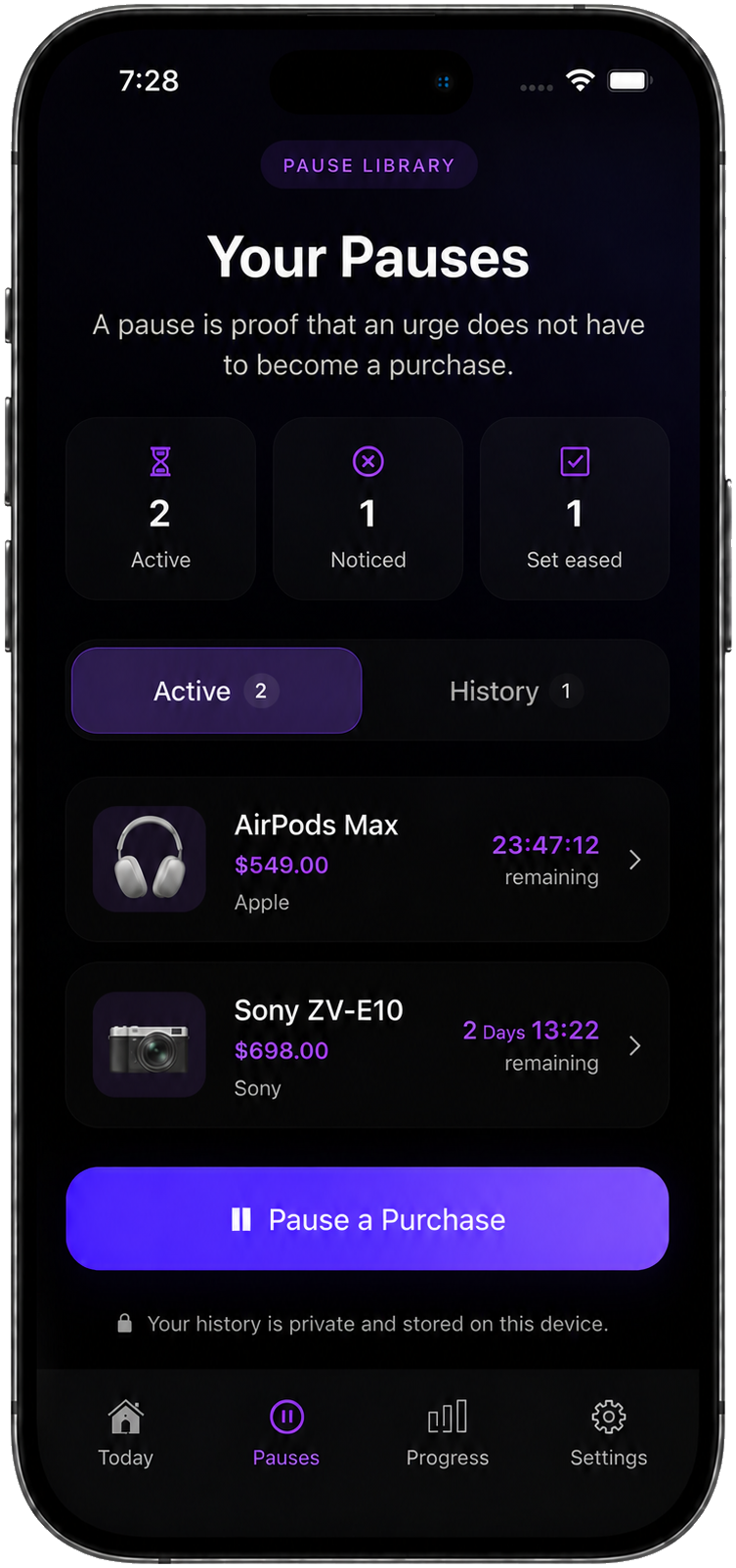
Your pause library

Give every purchase time.

Start a waiting period before making the final decision.

  • See every active pause and its remaining time in one place.
  • Return when the waiting period ends and record what you chose.
  • Keep your pause history private and stored on your device.
No Buy Pauses Library showing two active purchase waiting periods

Urge support

When the urge hits, follow your plan.

Check in with the urge, then choose a reset or start your usual purchase pause.
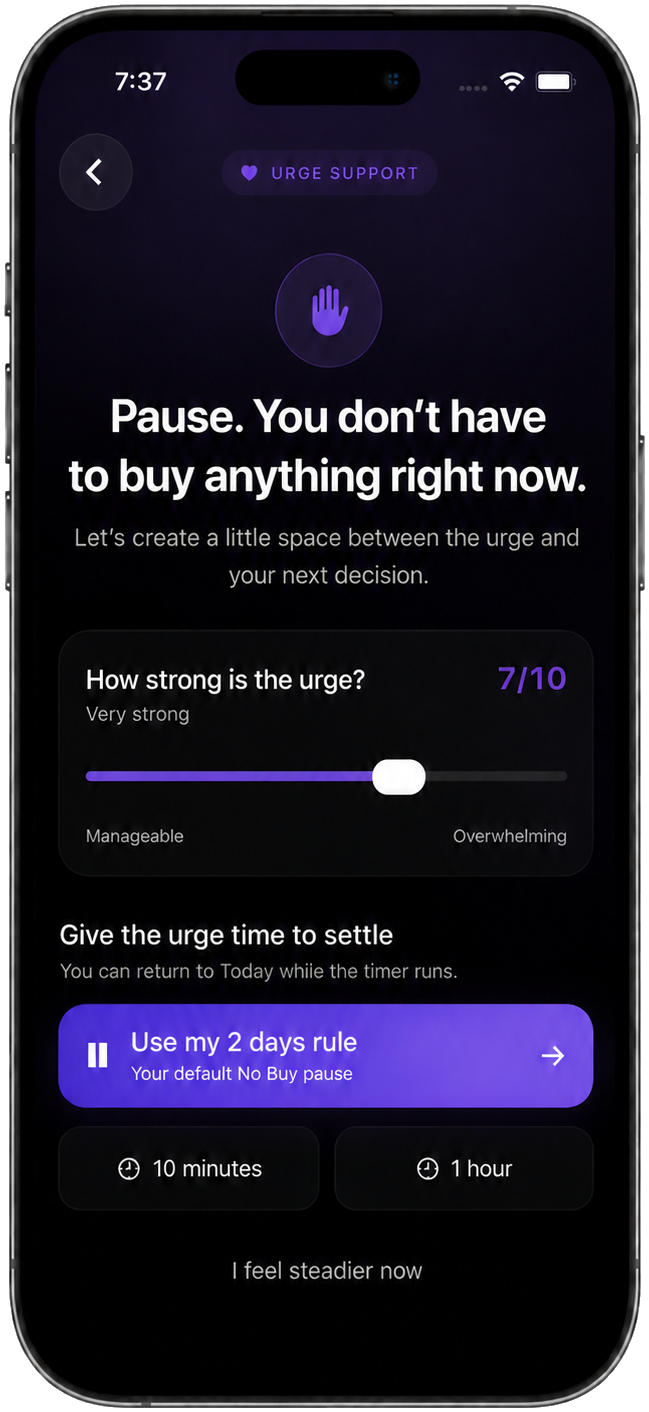
  • Rate the urge from manageable to overwhelming.
  • Use your default rule, a 10-minute reset, or a 1-hour reset.
  • Breathe, walk, reach out, or choose another saved recovery action.
No Buy Urge Support showing a 7 out of 10 urge and quick reset choices
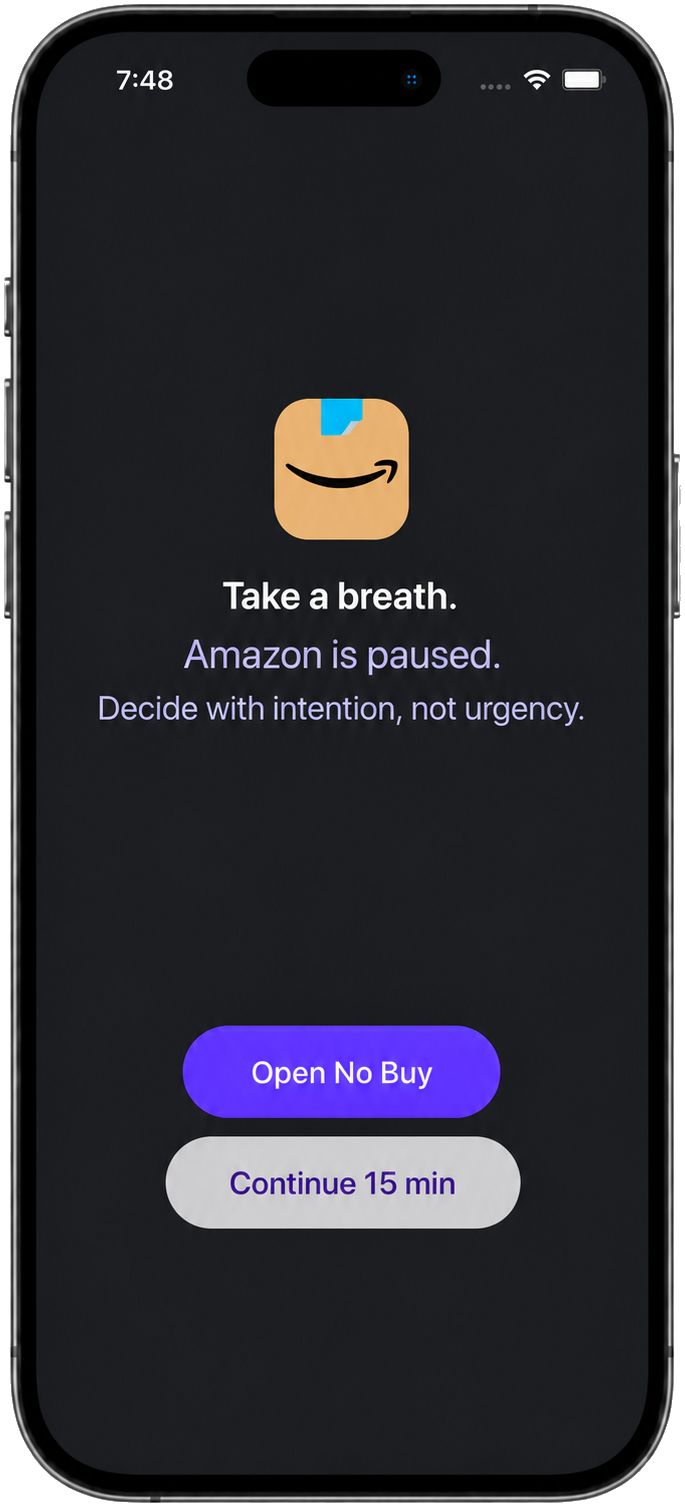
No Buy Shopping App Protection adding a pause before Amazon opens

Shopping app protection

Create space before you shop.

Optional protection adds a pause before individually selected shopping apps open.

  • Choose individual apps privately through Apple’s Screen Time picker.
  • Open No Buy for support or continue shopping for 15 minutes.
  • Only the apps you select are protected; categories and websites stay unblocked.

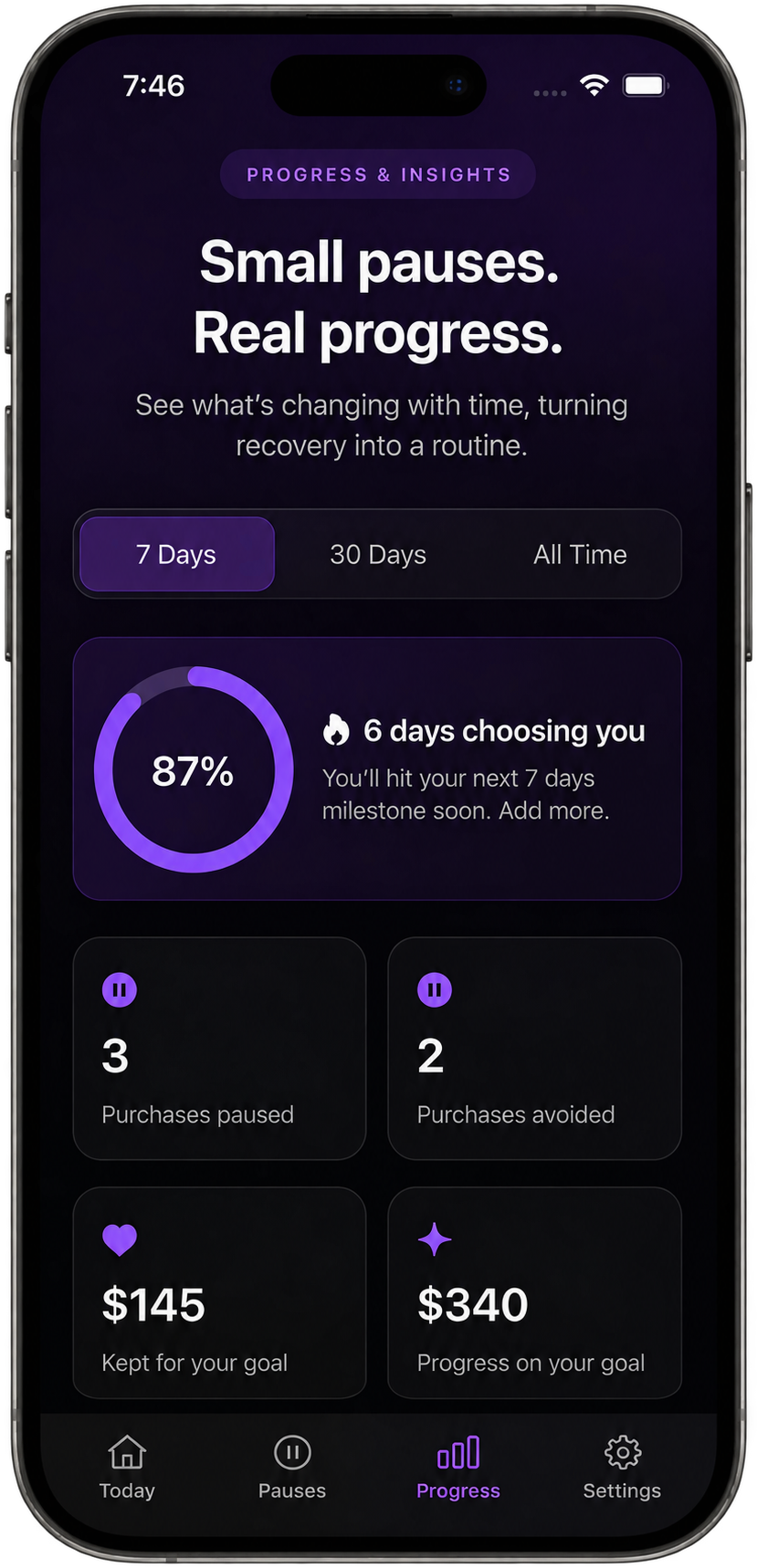
Progress & insights

See your choices add up.

Track recovery days, paused purchases, and money kept for your goal.

  • Compare the last 7 days, 30 days, or all-time progress.
  • See pauses, outcomes, and money kept together.
  • Notice patterns without turning one purchase into failure.
No Buy Progress and Insights showing recovery days, paused purchases, avoided purchases, and money kept
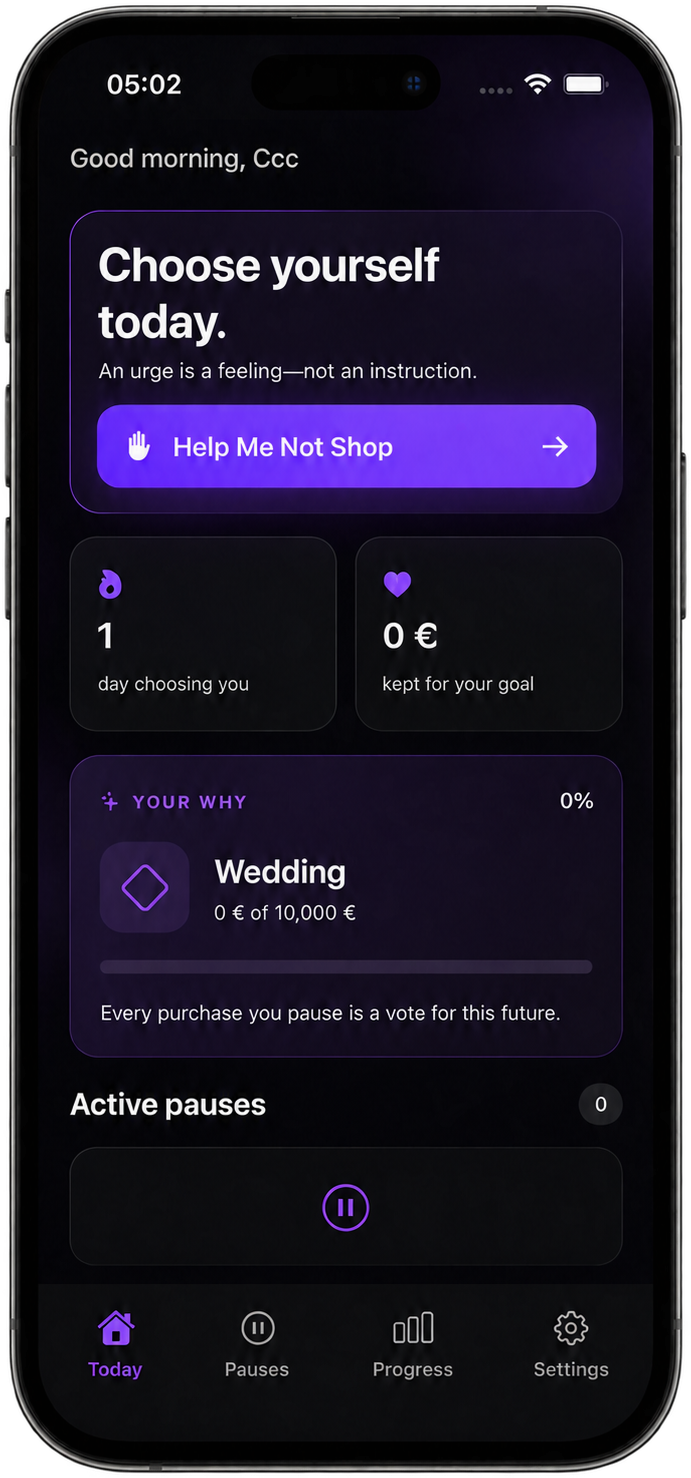
No Buy Today dashboard showing urge support, recovery-day progress, a personal goal, and active pauses

Your daily starting point

Pause the impulse. Keep the choice.

Start from one calm place for urges, goals, active pauses, and progress.

  • Open Help Me Not Shop when an urge needs immediate support.
  • See your recovery day and personal goal without judgment.
  • Return to active pauses or move between every part of your plan.

Try the idea

Ten seconds of space. One more deliberate check-in.

The real app supports longer resets and purchase pauses. This tiny demo lets you feel the principle.

Nothing to prove

An urge can be present without becoming an instruction.

Start the timer, leave the button alone, and notice how even a brief pause changes the pace of the moment.

  • No streak is at risk.
  • No outcome is marked good or bad.
  • You still make the final decision.
Interactive website exercise

Let the moment slow down.

You do not need to make the feeling disappear.

0:10remaining

This interactive timer requires JavaScript.

Reviews

A little space can change the choice.

Feedback shared with permission by people using No Buy to create more space between an impulse and a decision.

  • “Saving an item as a pause gives me time to decide whether I really want it—without telling me what I have to choose.”

    Maya K.

  • “Urge Support slows the moment down and helps me notice what is driving the impulse before I open another shopping app.”

    Jordan L.

  • “I like that buying something does not erase my progress. I can record the choice, reflect on it, and keep going.”

    Priya S.

  • “Connecting the things I let go to a goal makes each small decision feel tied to something I care about more.”

    Chris M.

  • “My response plan is simple enough to use when a sale creates urgency: step away, start a pause, and decide later.”

    Aisha R.

  • “The optional app protection adds one calm checkpoint before I shop, while still leaving the final decision with me.”

    Daniel T.

Designed around self-trust

Progress that doesn’t depend on being perfect.

A pause, not a punishment.

No Buy creates time for a decision. It does not decide that every purchase is wrong.

Patterns, not scores.

Insights help you notice what influences shopping without turning growth into another performance metric.

Information, not failure.

If you buy something impulsively, you can reflect without erasing your start date, pauses, or earlier wins.

FAQ
A few answers before you pause.

What is No Buy?
No Buy is an iPhone app for creating space around impulse purchases. It combines waiting periods, urge-support tools, personal response plans, reflections, goals, and progress insights. It is not a banking or budgeting service.
Does No Buy automatically detect my purchases?
No. No Buy does not connect to your bank, monitor transactions, or inspect retailer accounts. You decide what to add and what outcome to record.
Can No Buy block shopping apps?
On supported iPhones, optional Shopping App Protection uses Apple’s Screen Time frameworks to protect individual apps you select. No Buy cannot identify shopping apps automatically, and it does not block app categories or websites.
Can I still open a protected app?
Yes. The shield is designed to create a deliberate moment—not trap you. You can choose Urge Support or continue to the selected app temporarily.
Where is my activity stored?
Your goals, pauses, photos, urge check-ins, recovery plans, and reflections are stored locally in No Buy’s app and shared-app-group storage. Depending on your Apple backup settings, they may be included in Apple-managed device backups. Subscription status is handled separately by Apple and RevenueCat.
Does No Buy sync between devices?
No Buy currently has no account or cloud-sync system. A new device or reinstall may not contain your activity unless Apple restores applicable local app data from a device backup.
Can I delete my activity?
Yes. “Delete activity data” in Settings removes recorded pauses, photos, urge check-ins, recovery plans, reflections, challenge progress, saved name, and related local activity. Configuration such as your goal choice, default waiting rule, protection selection, and subscription status remains.
Is No Buy therapy or financial advice?
No. No Buy supports self-guided reflection and habit change. It does not diagnose or treat any condition and is not a substitute for professional mental-health, medical, financial, fiduciary, or emergency support.
Which devices are supported?
The current app is designed for iPhone in portrait orientation and requires iOS 18 or later. There is no Android, iPad, or web-app version at this time.
How do subscriptions work?
An active No Buy Premium subscription is required to enter the main app after onboarding. Available monthly and yearly plans, localized prices, billing periods, and any eligible introductory offer are shown inside the app using live App Store information. Apple manages billing, cancellation, refunds, and payment details. Existing purchases can be restored from the purchase screen.

Built for iPhone

Make shopping a decision—not a reflex.

Your choice still belongs to you. No Buy just gives it more room.